Showing posts with label Digital Literacy. Show all posts

Friday, 21 October 2016

George Couros – Innovator’s Mindset October 21st, 2016

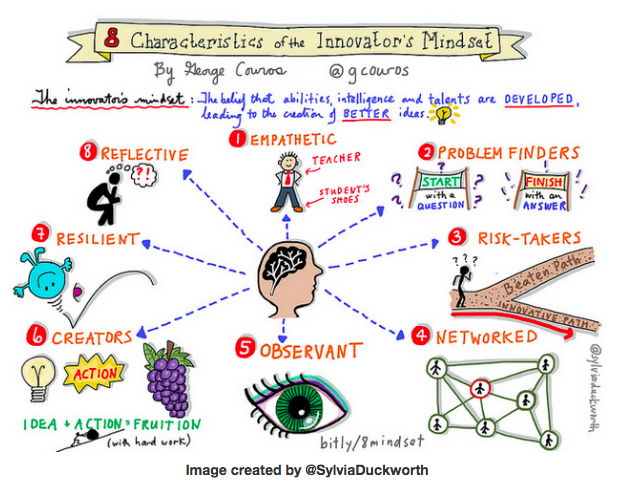
Today I saw George Couros, the author of The Innovator’s Mindset speak at the Langley Event Centre. George reminded us all that the goals of school versus the goals of learning are not always consistent and that it is our job as educators to prepare students for a largely unknown future. The best way that we can do that is to help them develop an innovator’s mindset and to do that we need to cultivate it in ourselves.

Favorite graphic of the day:
Favourite quote of the day:

George asked us, “What is one thing that has been reaffirmed today? What is one thing that has challenged you? What is one thing you are going to try?” Here are my answers: Something reaffirmed for me today was the idea that we need to let children create during their time at school! A challenge for me in teaching more innovatively has been getting technology that isn’t outdated into my classroom. Finally something I am going to try is improving my Twitter literacy.

Favourite take-away:
3 things students should have before they leave high school:
1.     A professional social network
2.     A digital portfolio
3.     An about.me page
And teachers should have these too!

2015/16 Ongoing Professional Development Throughout the School Year

In addition to professional development days, which I was negligent in blogging about this school year, two great Pro D opportunities I had was the collaboration/inquiry time worked into our school year and a book club at my school.
During the Inquiry/Collaboration time, I delved into the question of whether online Fresh Grade (FG) portfolios could improve my communication to parents about their children’s learning. Working with five other teachers at my school, we all found that it was a terrific tool for communicating what we were doing in the classroom and where each child was at with their learning. We could post pictures for the whole class to show parents activities like a Science demonstration, a group writing collaboration, a guest presenter or even a class demonstration of a dance. This provides parents with an insight as to what their child actually does at school and can help them further the discussion if their "what did you do at school today?" question is answered with "nothing" or “I don’t know.” FG also has an announcements feature that allows a teacher to send out an announcement such as a reminder and parents will be notified via a pop up if they have the app and an email. I would say the most powerful feature of FG is the ability to post pictures and videos of a student to demonstrate where they are at with their learning. For example, we posted pictures of drawings, projects, writing samples, and assessments as well as videos of counting, reading, and answering open ended questions. These can then have a note attached to them explaining what the teacher was looking for. If you attach a learning outcome to these activities and assess them as you post them. These learning outcomes and their attached assessment will be automatically used when you create a report card for your students. We all found FG to be such a useful tool for communicating with parents that we are each using it again this year. We received lots of positive feedback from parents.

Another ongoing learning experience that I enjoyed was a book club hosted by our vice-principal, Kim Anderson for Catching Readers Before They Fall by Pat Johnson and Katie Keier. A group of us met regularly throughout the year to discuss the chapters as we read through the book. I found this a great experience! Although I had pretty much learned most of the strategies and concepts brought up in the book through professional development over the last 21 years, it really helped freshen my perspective. There were so many ideas that I came across and realized that I either hadn’t done them in awhile or I had meant to incorporate them into my teaching at some point and then never did. As well discussing the topic of teaching reading to the students who don’t pick it up easily was valuable. We shared our ideas on how to find the time to spend the extra time needed with these learners. I’m very grateful for this learning opportunity!

2015/16 Pro D as a Digital Literacy Coach

Although my tech skills aren’t anything I would ever consider writing home about I agreed to help out my staff by taking on the position of Digital Literacy Coach back in January 2015 because I am passionate about the advantages technology can bring to education. The best part about taking on this role was the professional development opportunities it provided.
As DL coaches, we were provided with a couple of days of Pro D the week before school started and a 1-night/1-day Pro D conference in October. For me the biggest take-aways on these days was learning how to use iBooks Author and more presentation tools and strategies.
Here is a link for two ebooks that I wrote using iBooks Author:
One was created for our district’s iTunes channel and for parents who ask me how they can best help their children at home. The other was for our school website when some of the teachers at our school put on an event to help parents learn ways to help their children with their writing.
Another great experience was applying for the Langley School District’s Zone of Innovation Grant. Part of the agreement for getting five laptops for our school was to summarize and report on the ways we used them through an iTunes U course. I enjoyed learning the process of putting together an iTunes U course called Adventures in Literacy that can be found on Langley’s iTunes U channel: School District #35.
While helping my colleagues with their tech questions, I was also able to learn of lots of cool things that they were learning and exploring. I was able to report on some of the great ideas my staff was exploring in a blog that the districts DL coaches contributed to. It’s entitled Small Steps for Teachers, Large Strides for Education.
Ironically that’s a good metaphor for how I feel about my experience as a DL Coach. It was a small step for me to agree to be oJKE’s DL Coach but it helped me make large strides in learning more about using technology to provide students with terrific learning opportunities.

Friday, 1 May 2015

Odyssey '15 on February 20th, 2015

Sometimes when a Professional Development day falls so close to a report card deadline it can be a tad challenging to keep my mind on all the new ideas being presented and feel excited to get back to my classroom and try new things. However this Pro-D day was exceptional! I really enjoyed the three sessions that I attended and took away lots of solid and fledgling ideas on things that I want to try in my classroom. I feel excited to implement what I learned and the ideas that I formed while there.
My first session was “DL Coaches Unite!” presented by Sandra Averill. The main point of this session was how to help promote digital literacy in our schools. Personally I came away with three exciting ideas that I plan to implement. When it comes to using the iPads with the students, a real thorn in my side has been the amount of troubleshooting that I end up doing. When I spend so much time trying to solve problems and then pairing kids up because we can’t resolve issues with certain iPads, it leaves little time for actually doing meaningful learning activities. Sandra helped me come up with a plan that I think will help immensely. Stay tuned for a future blog entry on how that plan goes! We also discussed a few creation apps that I would like to explore further with story writing. Finally, we had been discussing some simple ideas that might be of interest to teachers who are a little more leery of technology and out of that I formed a terrific idea that would mesh well with my school’s reading goal. I plan on teaching my students to record themselves reading in PhotoBooth on my teacher laptop. Their job will be to pick a “good fit” book to record themselves reading. The idea behind this is to encourage them to hone their skill at choosing a “good fit” book but when the kids get efficient at it, I will have some recorded reading assessments and still be able to monitor the rest of the class. Plus the children get to choose their own reading material which is another aspect of reading that our school wants to work on.
The second session I attended was “Inquiry-based Learning in Grades K-3” presented by Brenda Boylan. I have heard others speak on inquiry learning a few times and I did a lot of inquiry learning when I taught intermediate. However primary comes with the challenge of students with less independence and less self-regulation. Brenda really helped me envision more ways of bringing inquiry learning into  my primary classroom without sacrificing a healthy learning environment. I already bring a lot of inquiry thinking skills into my Science activities. We do a lot of activities where we think like a scientist and determine what we will do to answer a scientific question. Then we make a prediction, carry out our experiment, record our observations and reflect on what we learned. After Brenda’s presentation, I will try some of the activities she suggested that promote inquiry-based thinking skills like: Object a Week, Wonder Window, Inquiry Notebook or Wonder Book, and I would like to post her Recording Thinking Prompts at my writing centre for writing prompts. Brenda also suggested books to read to our students about inquiry-based learning and she gave us some Scholastic Literacy Place Inquiry Unit book lists as well as their  Inquiry Process poster. Gotta love a ProD presentation that gives free stuff!
My last session of the day was “iMovies” presented by Katie Ropchan. Katie showed us a few examples of how we might use iMovies in our teaching: to introduce yourself, to showcase clubs, and for student projects. As a primary teacher I would like to have an iMovie going during Student Led conferences to highlight learning activities and one to show at the end of the year to celebrate the school year. Katie gave us a handout that addressed the different areas that we might want to use like: importing, transitions, themes, or music. I’ve played around with iMovie before but I got a lot more done while working on it in a group with Katie’s support and the handout. I even had a clip of all the photos that I’ve taken of my students this year that I was able to show them on Monday!
I really enjoyed Odyssey ‘15. So grateful to SD#35’s Professional Services for organizing a Professional Development conference with so many choices. It allows me to choose presentations that are meaningful and inspiring for my teaching practise.